
Legend of the Dragon King PC System Requirements
Steam minimums, then the caveats the store page does not print.
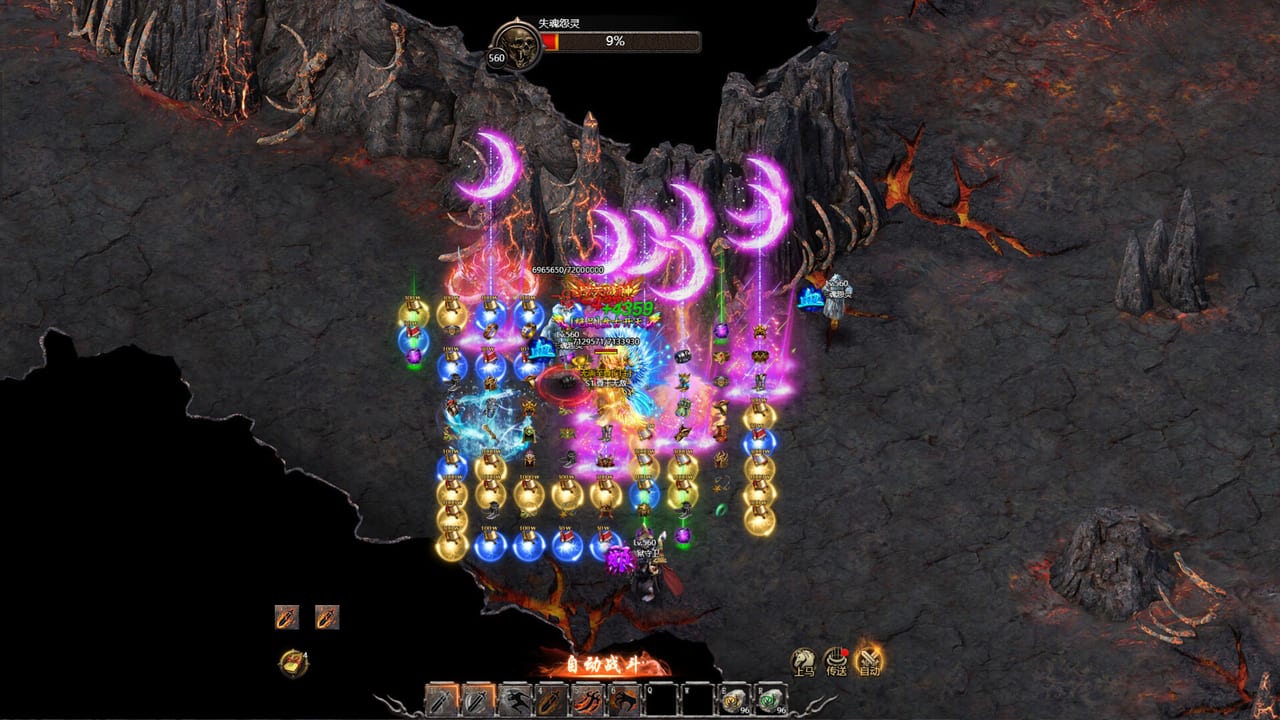
Legend of the Dragon King is a free-to-play Steam MMORPG. The store’s minimum PC block is short. This page copies it, then adds what the combat screenshots imply. If you cannot install, you do not need a tier list yet.
Official store URL stays on the links hub. Specs can change in Early Access; if they do, Updates will flag it.
Steam minimums (as printed)
| Item | Minimum |
|---|---|
| OS | Windows 10 and Windows 11 |
| CPU | Intel i3 (the listing spells it “Inter I3”) |
| Memory | 4 GB RAM |
| Network | Broadband Internet connection |
| Storage | 6 GB available space |
No recommended spec block was in the API dump we parsed. No Mac or Linux requirements were listed. Treat this as a Windows-only Steam client until the store says otherwise.
Languages with full audio: Simplified Chinese, Traditional Chinese. There is no English audio or UI on that list. Keep the beginner guide open as a label map.
What 4 GB RAM actually feels like
The dungeon loot screenshot is a particle storm: dozens of 元宝 beams, ground items, a full hotbar. The lava map adds a skull HP bar and purple moon effects. Auto-combat (自动) never stops spawning those effects. A 4 GB machine will run the plaza. It may hitch on a 1030-level camp with two other players.
Practical steps:
- Close the browser you are using to read this wiki, or use a second device for the wiki.
- Lower effects in whatever 设置 menu you can find (look for 画面 / 特效).
- Turn off other overlays. Steam overlay plus a recorder plus this client is how 4 GB dies.
- Farm 传奇之路 before 黑暗神域 if frames collapse. Map choice is on continents.
Network
It is an MMO. Broadband is not flavour. Cross-server bosses and castle siege will punish packet loss more than they punish a weak GPU. Wired helps. VPN to a Chinese route sometimes helps, sometimes gets you banned by a misbehaving anti-cheat — we will not recommend a vendor.
Disk and installs
6 GB is small. Screenshots, shadowplay, and Steam verify files will eat more. Leave headroom. Do not install on a dying USB stick and then blame Warrior for rubber-banding.
Family Sharing is listed on the store categories. That does not mean every paid item shares. Cash-shop purchases on a listing with player reports of a previous name (功夫之王传奇) should be treated as risky. Read Early Access notes.
Input
Mouse and keyboard. There is no Steam Deck verification on the dump we saw. HUD buttons are small Chinese labels. A 1080p monitor is what the screenshots are. 4K will only make the particles prettier while they kill your RAM.
After it launches on your machine
Create a character using class ranking. Turn 自动 on outdoors. If the frame time spikes only when loot beams land, your bottleneck is effects, not CPU. If it spikes when you open 免费会员, UI scale is the issue — close extra windows.
Gift codes will not fix frames (Codes). True skills will not fix frames (true skills). A Dragon King set will make the screen busier, not lighter.
If Steam refuses to install, the problem is the store, not this wiki. Use the official URL. This site does not host a client, a crack, or a Roblox copy.
Come back to the Tools Hub for HUD tables once the game is running. Specs are a gate. The plaza is the game. If you pass the gate on an i3 and 4 GB, you are inside the audience the listing asked for — just expect to recycle more often when hitching makes you miss a warehouse click.
Keep GPU drivers current. The listing does not name a GPU at all, which usually means “integrated might work, dedicated is kinder.” Kindness matters when 龙王之怒 finally procs and every player on the keep lights up at once.
Frequently Asked Questions
Quick answers to the most common questions.
Can I play on Mac or Steam Deck?
Steam listed Windows 10/11 only in the requirements we parsed. No Mac/Linux block was present.
Is 4 GB RAM enough?
It is the printed minimum. Boss camps with loot beams may hitch. Lower effects and close overlays.
Does the game need a good GPU?
The store page does not name one. CPU, RAM, and network are the printed constraints.
Where do I download it?
Steam app 4773970. The URL is on the links hub. This wiki is unofficial.